Free Online Vertical Video Editor with Portrait Templates
FlexClip's vertical video maker is a must-try tool for creating vertical (9:16) videos to share daily life moments, market products and services, and initiate calls to action on social media platforms like Instagram, TikTok, Facebook, and more. Access a library of stock vertical footage and images, along with customizable portrait video templates featuring a convertible aspect ratio for your projects. Easily crop your files to achieve a phone-friendly portrait orientation in seconds and incorporate music, animations, and transitions to enhance your video. With auto subtitles, AI voices, AI-generated imagery, and AI language translation at your fingertips, quick video editing has never been easier. Try it for free now!
Make a Free Video Handy video editor
 Rich video templates
 Extensive media library
 Dynamic text animations
- Trusted by:






Trending 9:16 Video Templates for Free
 CustomizeAI Recreate
Vertical Oktoberfest Promo
 CustomizeAI Recreate
Abstract Green Gold Circle Cd Music Playlist Vertical Instagram Story
 CustomizeAI Recreate
Red Blur Merry Christmas Santa Vlog Music Playlist Vertical Instagram Story
 CustomizeAI Recreate
Blue Snow Winter Ai Boy Music Playlist Vertical Tiktok Instagram Story
 CustomizeAI Recreate
Black Gold Circle Play Cd Music Playlist Vertical Youtube Story
 CustomizeAI Recreate
Vertical Real Estate Ad
 CustomizeAI Recreate
Gold Vertical Real Estate Agency Dream House Sale Listing Promo Ad
 CustomizeAI Recreate
Vertical Real Estate Agency Listing Video
 CustomizeAI Recreate
Easter Egg Discount Business Promotion Ad Vertical Instagram Tiktok
 CustomizeAI Recreate
Abstract Blue Floral Play Cd Music Playlist Vertical Instagram Story Intro
 CustomizeAI Recreate
Vertical Real Estate Investing Video
 CustomizeAI Recreate
Purple Vertical Body Wash Promotion
Making Vertical Videos in One Click
Make Use of Vertical Video Templates
Have no ideas of what to create in your vertical video for social media? Why not browse creative, professional vertical video ideas provided by FlexClip? Use it creatively to stack multiple videos. When you've chosen a vertical template, uploading videos & images will be vertical automatically.
Easily Adjust a Bunch of Clips & Images to Vertical
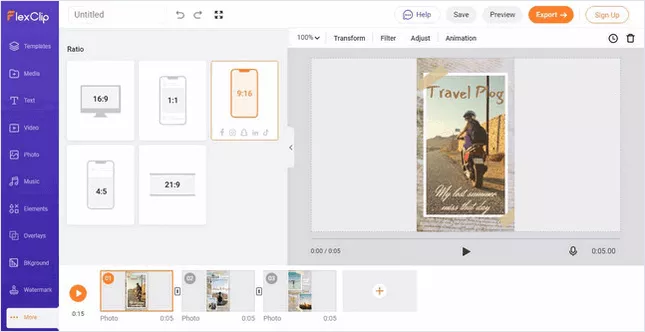
Captivate audiences with eye-catching images and a bunch of attractive clips. Merely one click can turn landscape to vertical. Drag landscape to the left or right, define choose which part to show in vertical frame, after that your vertical videos will appear more compelling.
Stunning Footage, Images & Animated Texts
Whether adding spectacular films, photos or animated texts, FlexClip does it all for you. You can easily upload your own photos and videos or find professional visuals from the stock, and then simply drag and drop into your project to create super cool vertical arts!
Find Perfect Background Music for Vertical Video
What if you could make your videos creative? Achieve this by adding perfect background music to your vertical video, and give it a musical touch. FlexClip has a large library of soundtracks & music to search & choose from, there's no need to worry about copyright.
Record High-quality Voiceover for Vertical Video
Doesn't matter if it's a corporate video, a commercial or an animated film; you can record high-quality videos just by adding voiceover to vertical video, and give it a more cinematic touch.
Why Should You Use Vertical Videos for a Better Result?
Vertical Videos Are Perfect for Social Media & Mobile
Vertical video is now widely accepted and used across all major social media platforms, to the point where horizontal video on mobile appears weird & jarring. The tables have been turned completely. When you've nailed down mobile users, you're way more successful than your competitors missing that part.
Vertical Videos Feel More Natural on Social Media and Mobile
Holding the smartphone vertically allows us to perform everything naturally, from typing messages on WhatsApp to scrolling through TikTok suggestion videos to purchasing something on Amazon.
Vertical Ads Are More Engaged for Livestream
Vertical videos allow you to engage with replies and comments in the most natural way, if you go live or make your videos go livestream.
Vertical Video Is The New Trend
Snapchat was the first social media platform to popularize vertical video by allowing users to tell their tales in full-screen vertical mode. And, since then vertical videos has been a trend, then generate buzz around the world.
Your One-stop Vertical Video Maker & Converter
94% of the time, mobile phone users choose to browse social media contents with phones upright. As a result, 9:16 aspect ratio video for social media is key to gain views & audiences on mobile. Whether you have vertical or horizontal videos, FlexClip can help you adjust & fine tune them to vertical exactly as you hope so in just a matter of seconds.
Want to make your next vertical video be a social media hit? Make use of FlexClip stunning video editing features, like animated texts, natural transitions, as well as picture-in-picture, etc. Utilize extensive, professional footage & images to add, trim and modify to perfect your vertical video creation.
Why You Need to Make a Vertical Video

Boost Sales
A compelling video can absolutely influence buying behavior, leading directly to sales.

Increase Traffic
Nothing can compare to the power of video content when it comes to driving traffic to your site.

Encourage Social Shares
Videos on social media platforms generate more likes and shares than images and text combined.
How to Make a Vertical Video in 3 Steps
- 1
Add Media
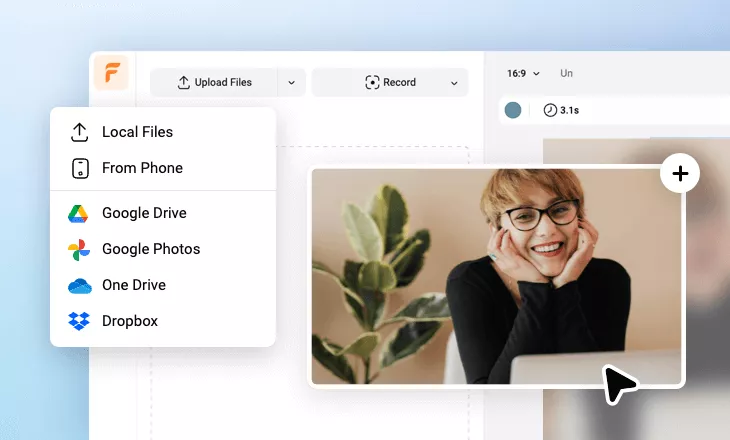
Add videos or photos from computer or stock libraries to the scene.
- 2
Customize
Add text, music, and voiceover to customize your vertical video.
- 3
Export
Download your vertical video in various ratios and definitions or share it online with the world.